
Network Design Document
Project Name: Router A Stick ( ROAS ) Office Network Setup
Document Version: 1.1
Date: December 25, 2025
Author: Rajkumar Neupane

1.0 Executive Summary
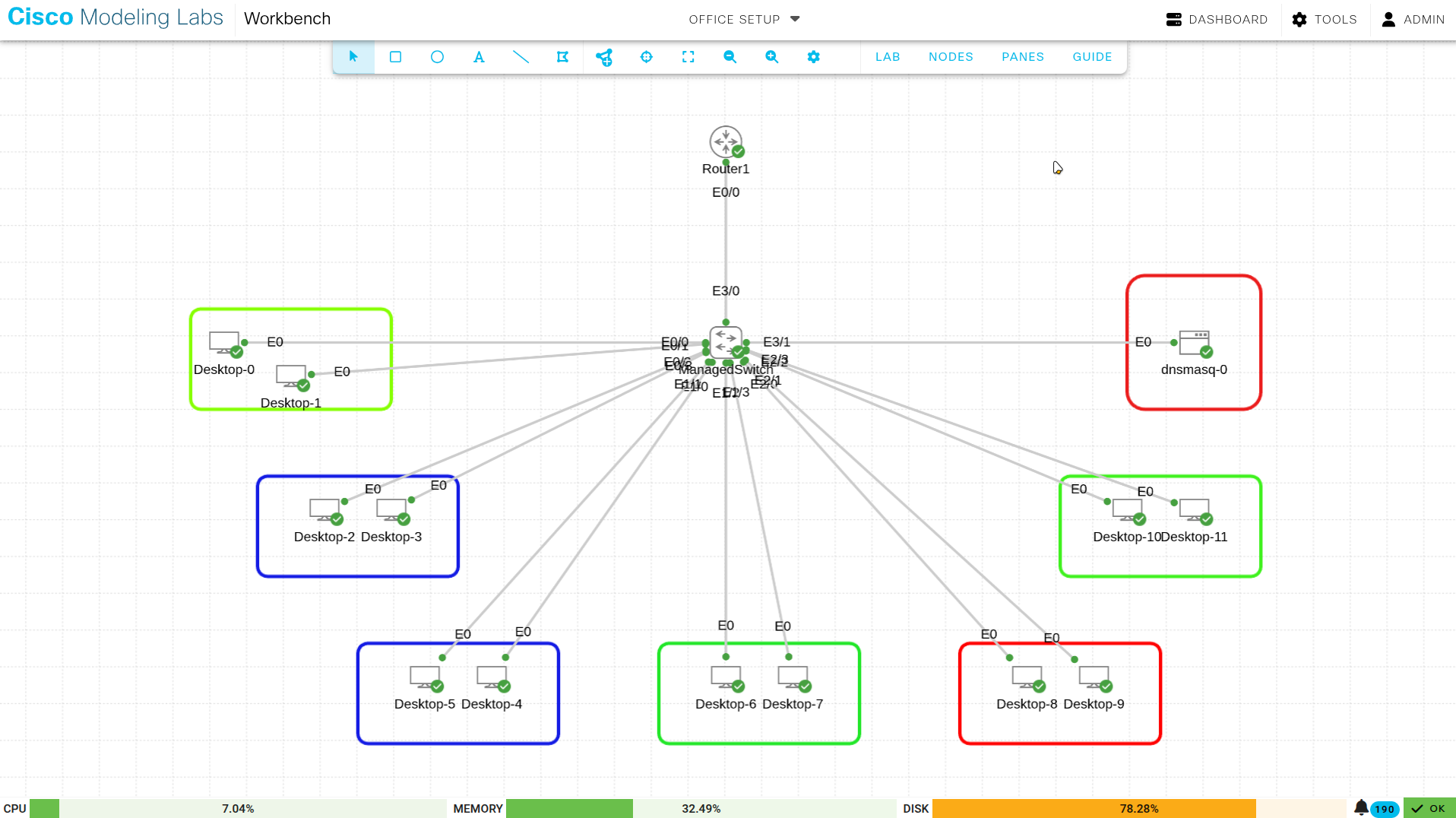
This document details the logical and physical network design for the “Lab One” office environment. The infrastructure supports 12 end-user devices distributed across three departments (HR, Sales, and IT). The network utilizes a Router-on-a-Stick (ROAS) architecture for inter-VLAN routing and a centralized Dnsmasq server for automated IP addressing and name resolution.
2.0 Hardware Inventory
The following hardware components are utilized in this implementation:
Table 1: Equipment List
| Device Type | Quantity | Description | Role |
|---|---|---|---|
| Router | 1 | Cisco IOSv Router | WAN Gateway, Inter-VLAN Routing (ROAS) |
| Switch | 1 | Cisco IOSv-L2 Managed Switch | Access Layer, VLAN Segmentation (802.1Q) |
| Endpoints | 12 | Alpine Linux Desktops | End-user workstations for HR, Sales, and IT |
| Server | 1 | Dnsmasq Docker Container | DHCP and DNS Services (Hosted in IT_MGMT) |
3.0 Network Topology and VLAN Design
To ensure security and traffic segmentation, the network is divided into four distinct Virtual LANs (VLANs). Traffic between VLANs is managed by sub-interfaces on the router.
Table 2: VLAN Configuration
| VLAN ID | Name | Department | Subnet | Gateway IP |
|---|---|---|---|---|
| 10 | HR_DATA | Human Resources | 192.168.10.0/28 | 192.168.10.1 |
| 20 | SALES_DATA | Sales | 192.168.10.16/28 | 192.168.10.17 |
| 30 | IT_MGMT | IT Support | 192.168.10.32/28 | 192.168.10.33 |
| 99 | NATIVE | Management | 192.168.10.48/28 | 192.168.10.49 |
4.0 Switch Port Assignment
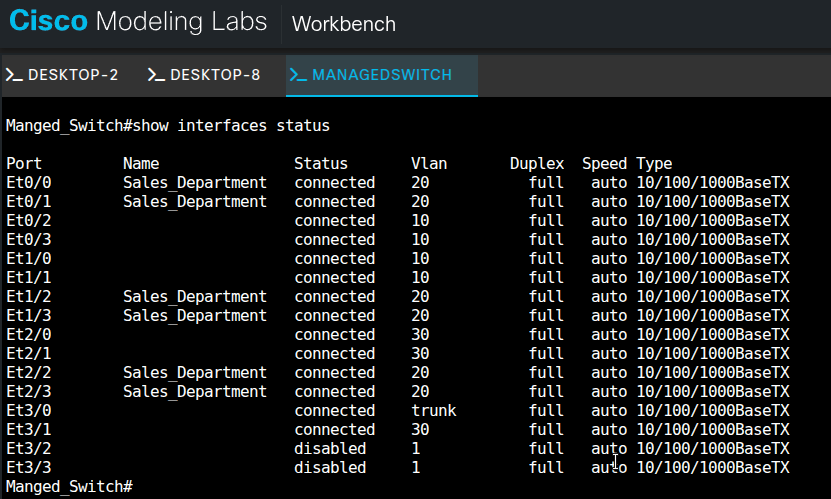
The managed switch is configured with specific access ports for each department and a Trunk port for the router uplink. Port Security and Spanning-Tree Portfast are enabled to ensure stability and security.
Table 3: Physical Port Mapping
| Switch Interface | VLAN | Department | Connected Device |
|---|---|---|---|
| Et0/2, Et0/3, Et1/0, Et1/1 | 10 | HR | Desktops 2, 3, 5, 6 |
| Et0/0, Et0/1, Et1/2, Et1/3, Et2/2, Et2/3 | 20 | Sales | Desktops 0, 1, 6*, 7, 10, 11 |
| Et2/0, Et2/1 | 30 | IT | Desktops 8, 9 |
| Et3/1 | 30 | IT | Dnsmasq Server |
| Et3/0 | Trunk | Uplink | Router1 (Ethernet 0/0) |
5.0 Core Services Configuration
5.1 DHCP and DNS (Dnsmasq)
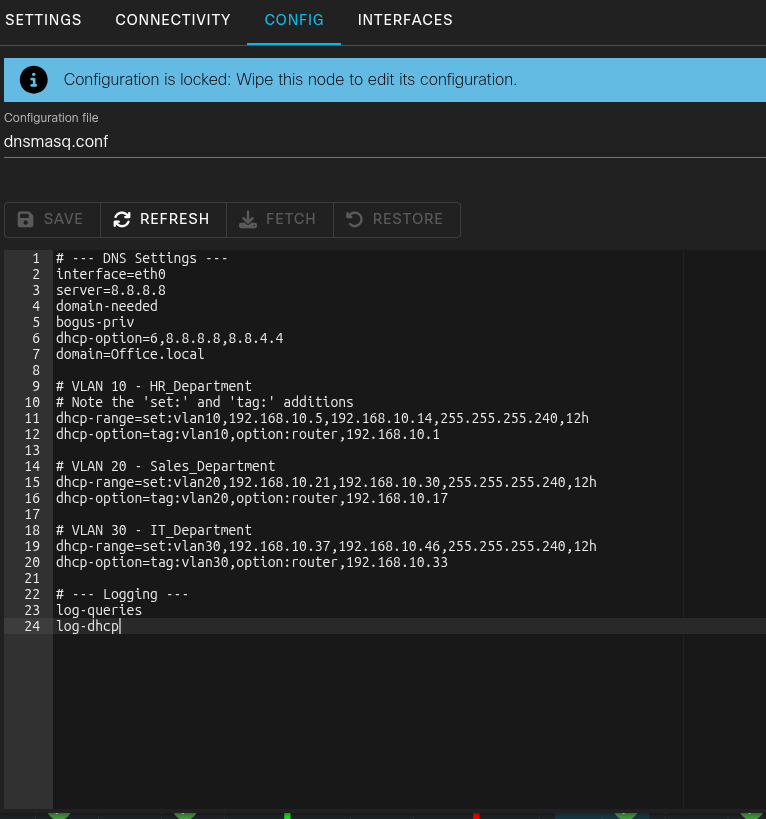
The network uses a central Dnsmasq server located at 192.168.10.34. It uses Tagging logic to provide unique gateways for each VLAN while sharing a common DNS pool.
Dnsmasq Configuration Snippet:
Bash
# VLAN 10 - HR_Department
dhcp-range=set:vlan10,192.168.10.5,192.168.10.14,255.255.255.240,12h
dhcp-option=tag:vlan10,option:router,192.168.10.1

# VLAN 20 - Sales_Department
dhcp-range=set:vlan20,192.168.10.21,192.168.10.30,255.255.255.240,12h
dhcp-option=tag:vlan20,option:router,192.168.10.17
6.0 Implementation Verification
6.1 DHCP Lease Success
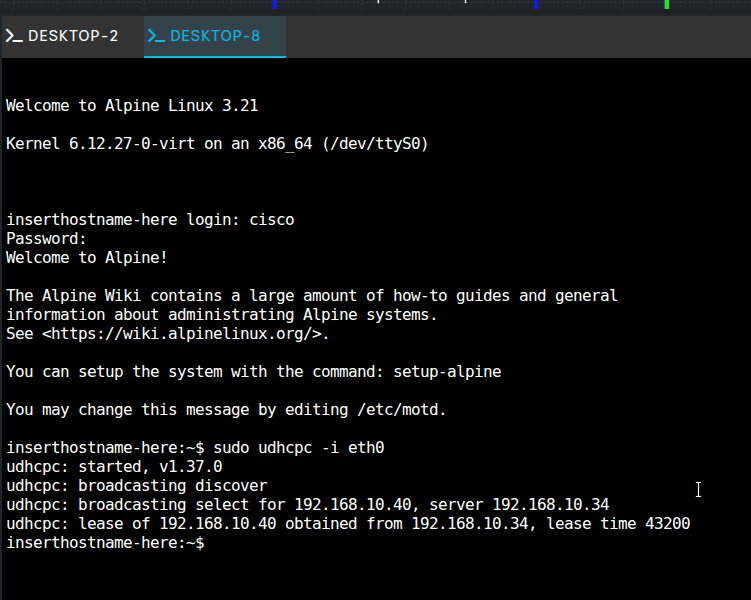
Successful implementation is verified by the ability of Alpine Linux clients to pull correct IP addresses from the designated subnets. All clients successfully reached the relay agent at 192.168.10.34.
Verification Log (Desktop 0 - Sales):
Bash
inserthostname-here:~$ sudo udhcpc -i eth0
udhcpc: broadcasting select for 192.168.10.21, server 192.168.10.34
udhcpc: lease of 192.168.10.21 obtained from 192.168.10.34
6.2 Connectivity Testing
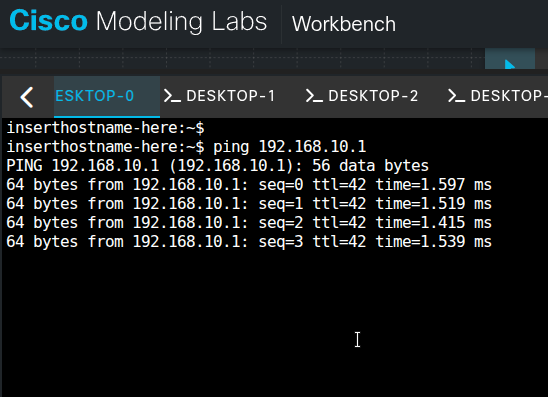
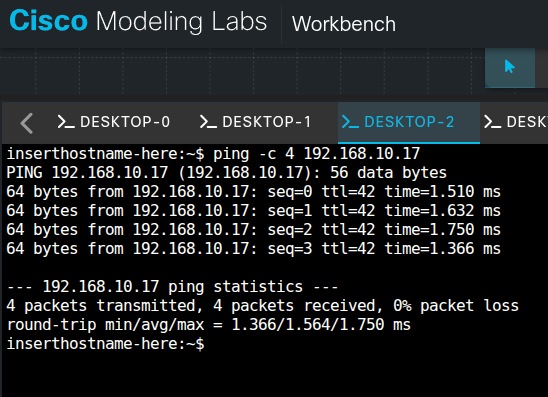
Connectivity is confirmed via ICMP ping tests:
- Local Gateway Ping: Clients can ping their respective sub-interfaces (e.g., 192.168.10.1).
- Inter-VLAN Ping: Verified communication between HR (VLAN 10) and Sales (VLAN 20).
7.0 Conclusion
The Lab One network successfully demonstrates a secure, tiered office infrastructure. By utilizing a Router-on-a-Stick design and DHCP relaying, the network provides efficient resource management and department isolation while allowing controlled inter-departmental communication.
End of Document